

My children love the opportunity to play on our iPod Touch. It is technically my toy, but they (collectively) spend more time with it (and have more apps) than I do. I generally don’t mind though – nearly all the apps are educational. Our latest addition and current favorite is the StoryBuilder app from Mobile Education.
I initially was playing with my 4 yo daughter and 6 yo son using this app. Once their big sisters caught on to how much fun it was though, they were using it a lot, too. There are 3 different levels so setting it up for their abilities was easy. We had to set limits so everyone could get their turn.
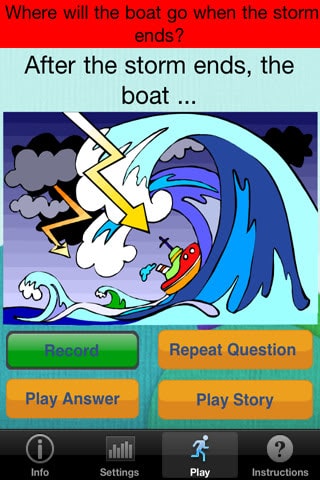
What exactly does the app do? How is it educational? A picture is shown that your child makes up a story to go along with. Depending upon the level some questions will be asked (or not) to spark their storyline. The question is read aloud by the app (huge plus for my younger children!) and the start of an answer is shown. Your child doesn’t have to begin their answer this way, but it can be helpful if they are struggling to say something. When they know what they want to say, simply touch record and say it. They can then play back what they recorded, re-do it or go to the next question. Once they have gone through the prompts (there are more for the middle level than the beginning level and no prompts for the highest of the three levels), they can play their story.
They will hear their voice as the recorded answers/sentences are played back. They then have the option to e-mail the story to share it. We have e-mailed our stories to grandparents and to our own e-mail to share with Daddy and to see how it all works. The one receiving the e-mail can listen to the story and see the picture using QuickTime. QuickTime is free and easy to download/install if not already on the computer.

My children have thoroughly enjoyed telling their own stories. The four year old needs someone to sit with her to help her with what to do next, but she mostly does it on her own. The other children need no help and often have to be reminded that others are waiting. My older girls like the question prompts better than just being on their own — at least at first. The eldest is now choosing to do the level without question prompts and just jumping in with her whole story. Not that this is “at her level”. She is enjoying making stories for her younger siblings.
I love that they are using their imaginations. They are learning what makes a story interesting (and not) when they play back their responses. Often, they would be repeating some of the same things as they answered different questions. They would figure out different ways to say something to not sound redundant. I love things that make my children think. Using the StoryBuilder App, my children are thinking and having fun.
You can get the StoryBuilder App for $5.99. It is for the iPod Touch (4th gen), iPhone, and iPad ($7.99). Mobile Education has many apps for your device to develop or strengthen language skills for elementary age learners of all abilities. Be sure to check out what they offer to sneak some educational fun into your children’s day.
Schoolhouse Crew members received this app or Rainbow Sentences (this looks so cool!) to review. To see the other reviews, start from the Schoolhouse Review Crew blog post.