


Prior to learning of Touch Math through the Schoolhouse Review Crew, I was not familiar with the name. Then, I started seeing them everywhere – living math groups, groups for right-brain learners and for dyslexic children. I wonder if they have been discussed all along and I was just now paying attention. They are certainly not new. Their methods and materials have been around nearly forty years. After our recent experiences with Touch Math, it is easy to see why. A great example of a product created for those with special needs that has appeal beyond the labels.
We have been using their First Grade program for several weeks now. If you are new to Touch Math like our family, you will be delighted at how easy it is to implement. They have curricula for Pre-K through Second Grade. There are materials for using Touch Math for 3rd and 4th grade learners as well, but that doesn’t appear to be set up in the same easy-to-go manner.

The First Grade program ($199.95 all four units) is divided into four units (can purchase individually $59.95 each) which each have six modules. The teaching materials include a 20+ page guide to learn more about the unique methods and materials (including common-core standards for those needing that information). The overview for each module tells the objective, the pre-requisite skills for the module, vocabulary used and materials needed. The materials required are the typical materials you would expect – counters, crayons, scissors, glue, paper, etc. The optional materials are the fun manipulatives that we’ll look at a bit later.

Based upon my son’s abilities (typical 7 year old first grade boy) we began with the very first module in the first unit. He could do some of things in the later modules, but I wanted to make sure we didn’t skip something important in these important early skills. The Touch Math program goes at your child’s pace, so I knew we could move faster if he demonstrated competency. I was really surprised that what I thought he knew, he really didn’t.
One of the methods of using Touch Math is the time for each lesson. You are not working to complete a set amount of work. The materials are not set up as lessons per se. You will work with your child for a set time period. The time is 2 to 2 1/2 times their age. My son is 7, so we worked for 14 to 17 1/2 minutes each day. Some days he was very done after 14 minutes. Other days it may have stretched to 20 minutes. I never let us go past 20 minutes, even when he was enthusiastic.
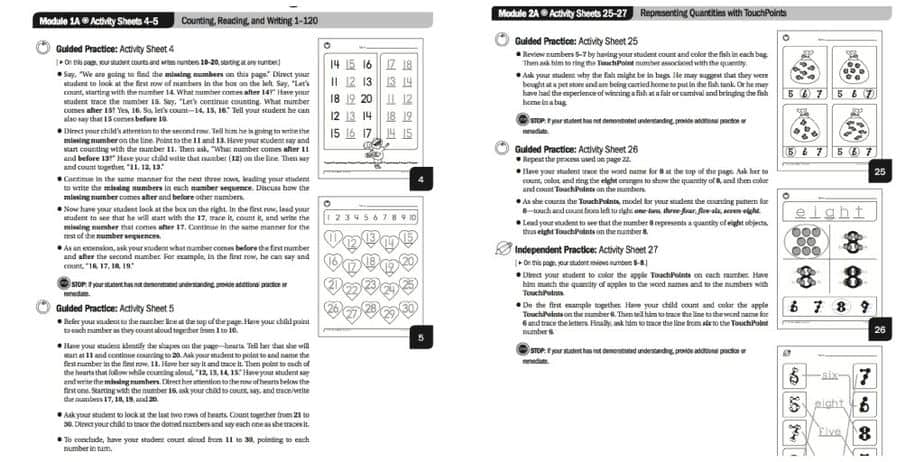
The Home School Guide has been so easy to use. The Activity Sheets are shown on the page with the teaching instructions. The vocabulary is bold, so you can be sure to use the correct words to explain and teach. I like having a guide, but often tweak and paraphrase. The layout makes sure that I use the right vocabulary, yet I still have complete freedom to instruct my way.
Throughout the instructions there are additional notes and symbols to guide you. Each page is either meant to be guided – you work with your child, or independent practice and a handy symbol lets you know when to do which. Periodically there is a reminder (the stop sign) to check that your child understands before progressing. I really appreciate these reminders rather than waiting until the test at the end of the module to find that what you thought was understood wasn’t. There are also indications of when certain manipulatives can be used or other interesting information.
After the pages of instruction are Review, Test and Closure. The Closure section includes real-world connections to the lessons completed. There is also a progress monitoring sheet to track the progress through the module. As much as I like lists and checking boxes this is not something I see myself using. This seems like one of the things useful for the classroom but not necessary for the homeschool. There are a few instances of classroom direction versus home use, but Touch Math really shines in the one-on-one, intimate instruction aspect.
The final thing of each module is the activity sheets. The sheets are simple, clean and black and white. This keeps from being distracting and allows your child to color it if they desire. It also makes it more economical when printing. Thus far, I have not printed the teaching information but only the activity sheets. I printed the sheets for the first module, three-hole punched them and place them in a simple folder. I chose a folder over a binder for my son’s daily use but will keep the completed pages in a binder. I will probably print the teaching pages and use a binder, maybe keeping his completed work in my binder. The file is a pdf so you could even import them to a tablet for ease of use.
As it is, Touch Math is a wonderful program. Multi-sensory curricula appeal to those with special needs and those without. Any time my children can touch, move and interact with what they are learning the process is always more enjoyable. They learn more (and more easily) and retain what they learn. We have used math curricula that was very independent for the student, another that uses manipulatives but is light on instruction, and for a short time, the textbook approach. I really, really like how Touch Math incorporates the best of these. And, it is really easy for me to use. I am not a lesson planner in that we will do page x on this day, etc. Touch Math fits how I teach and how my children learn.
So, now that you know how wonderful I think the Touch Math program is, what could be better? The manipulatives! Not just colorful, fun and exciting. The basis of Touch Math is the Touch Points for the numerals. There are a few different items available that you could use for re-inforcing the Touch Points. The first are Touch Numerals ($99). This set comes with 3 sets each of the numerals 0-9, operation symbols, 205 Touch Points and 10 base-ten trays. There are numerous concepts to use this set with. The obvious one is learning the Touch Points – counting them and placing them on the numerals. Using just the Touch Points and the base-ten trays concepts like place value, carrying/borrowing and multiplication become easier to understand. One of my older daughters has been struggling with carrying in 2 digit addition. Just a few minutes with these materials and it became clear. I love seeing those “light-bulb” moments!
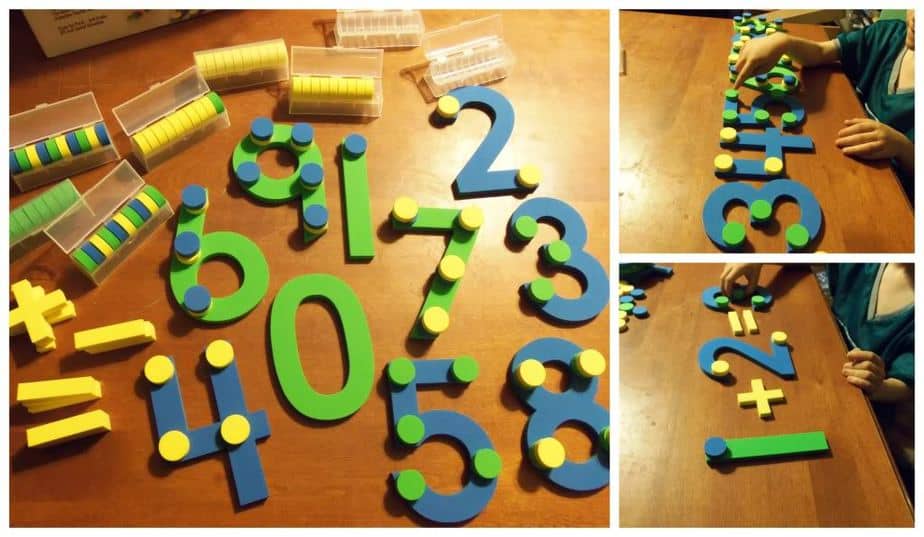
I am still searching for the best solution for keeping these in. The cardboard box they were shipped in was sized great — for that purpose. Once you get all those little circles loose (not to mention the 6″ numerals and the symbols) they don’t all fit in the base-ten trays (not that you need more than 10 trays). Even those trays don’t fit in the shipping material unless empty. Not a problem with these manipulatives, just me pretending to be neat and tidy (and not wanting to lose any!).

The other thing we have been using in learning the Touch Points are the Student Number Cards ($24 set of 10). These cards come as a complete set (1-9) perforated to tear/cut into individual cards. The individual cards measure 2 7/8″ x 3 5/8″ and are colorfully printed on both sides. It is recommended to laminate them first. My laminator does better if they are separated prior to laminating. It may appear both sides are the same, but one side labels the Touch Points in the order in which they are counted. My two youngest learners (ages 3 & 5) like matching the cards. These colorful cards appeal to a variety of ages. My son loves these cards and can often be found with a set in his pocket — really!
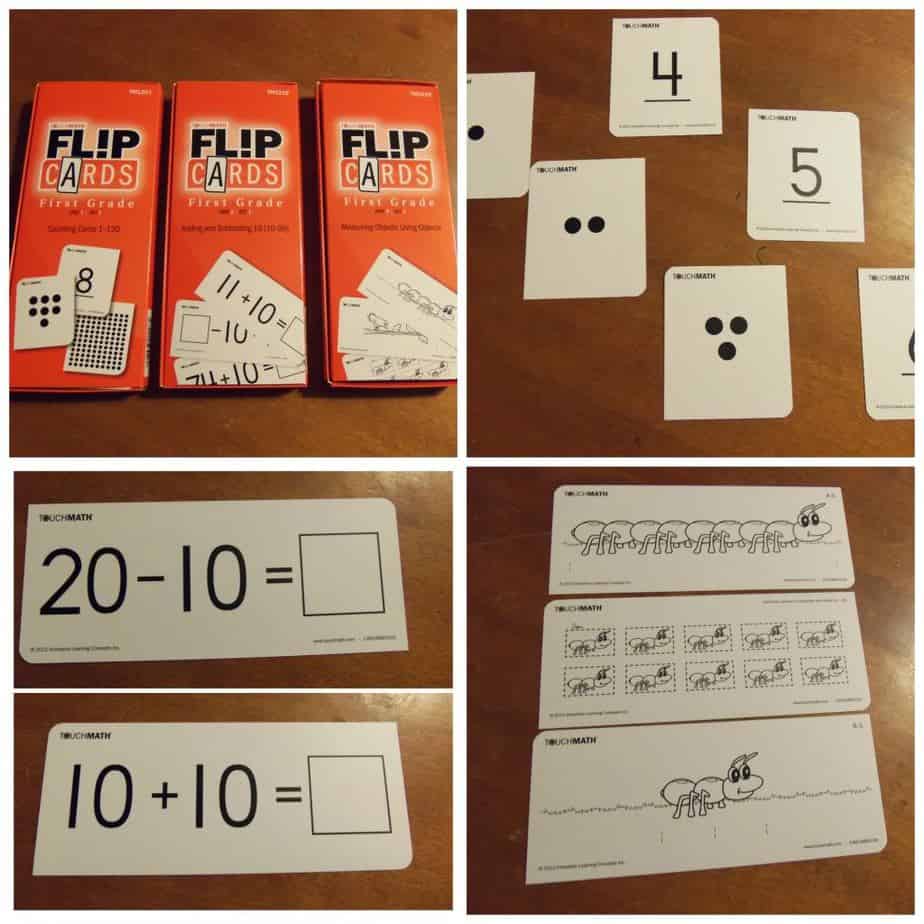
At first glance these may look like a simple set of flash cards. The first set does have a card for each numeral 1-120. The reverse side of this set has dots. Once you reach 10, those dots are arranged in a single row. Once into the higher numbers this makes it so easy to count and see. I have also shown above cards from units we aren’t in yet. The lower left are from Unit 3, Adding and Subtracting 10. The cards shown on the lower right are from Unit 4, Measuring Objects Using Objects. The card in teh center is to be cut into the individual bugs. Those are the units for measuring the other cards. These look really cute! There are numerous games and activities that you can do with these cards – both individually and in groups. The FlipCards ($19 each set) come in sets related to the units. For each of four units there are 3 sets of FlipCards.
These manipulatives are not necessary for using Touch Math, but they have been designed to work with each other. Throughout the teacher guide are suggestions of when to use certain materials. For my active, wiggly boy, the more hands-on the better. I really appreciate that these materials (the curriculum and the manipulatives) can be purchased as you get to them. For many of us working on a budget, this is much easier to fit in.

The final thing in our Touch Math arsenal is the Touch Math Tutor First Grade Software($99 for single license). This software is compatible with a variety of operating systems from Windows and Apple, but be sure yours is on the list. What may appear to be all fun and games for your child is actually reinforcement and valuable learning of many math concepts. From the Student Assessment and Teacher Options you can customize the software for your learner. You can turn off the background music, track progress and even control doing the topics in order (from the teaching guide). For children that like playing computer games, this is the perfect accompaniment.
Other Schoolhouse Review Crew families reviewed this and other levels. Don’t miss their reviews.

