

You’ve just hit publish on your latest post. You’re not done yet – now it’s time to share it on social media. There are ways to share with the various “hot spots” that can take many steps and some that are easier. I prefer to work smarter, not harder. When I can find something to do that work for me it gives me more time to play with my children (or get lost on Pinterest).
I have been using this easy way to have my blog posts automatically tweet ever since I signed up with FeedBurner. There are ways to link your blog to auto post to Twitter, but most require those hashtags to be in your title. I just don’t like the way that looks on my blog. I am so glad this set up with FeedBurner uses my blog’s labels to automatically make hashtags and keeps my blog hashtag-free.
If you are not signed up with FeedBurner, it is pretty easy to do. The latest I have read says it won’t be updated any longer (nothing new added, etc.) but that it is not going away. From this post I found from a few months ago, even WordPress blogs can use FeedBurner.
When you are logged into your FeedBurner account for your desired blog, there is a tab at the top labelled “Publicize”. Click here and you’ll see a menu of selections down the left. Approximately the 6th one down says “Socialize”.
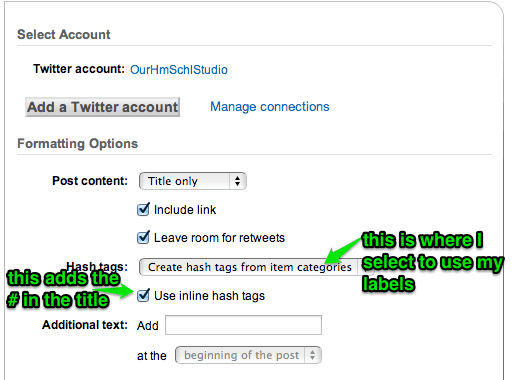
You will need to connect your Twitter account, then customize your feed to Twitter. Obviously, you’ll want to include a link to get to your blog. I like to leave room for retweets also. There are some choices for your hashtags. I choose “Create hash tags from item categories” In Blogger, these are the labels you choose for your post.
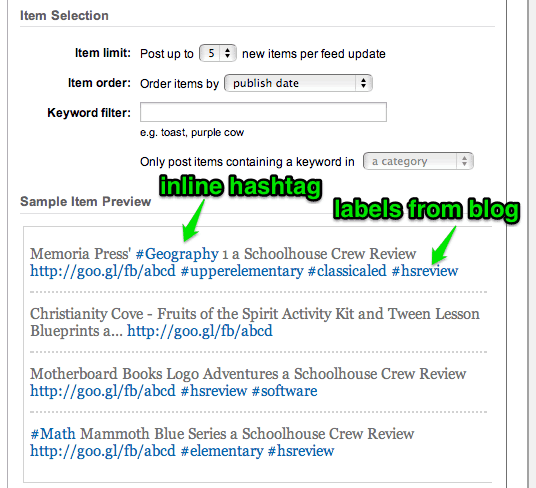
Memoria Press’ Geography 1 a Schoolhouse Crew Review
If this is too “Greek” (or is that geek?) for you, I can try to help you further – just leave a comment or drop me an e-mail. Now go, set this up so you have more time for the fun things!
